
A data breach is a security incident in which private/confidential information is viewed, copied, transmitted, or used by an unauthorized individual. This may involve personally identifiable information, personal health information, financial information, intellectual property, or trade secrets of companies.
Data breaches are far more than a temporary terror: they can hurt businesses and consumers in various ways, and the expenses caused by them can damage reputations and take time to repair.
Breaches affecting hundreds of millions, or even billions, of users have become quite common. In 2016, the Internet service company Yahoo! confirmed that all 3 billion of its users were impacted in what is considered the biggest data breach in history. Specific user details, including names, mobile numbers, email addresses, date of birth, and hashed passwords, were leaked.
In 2018, NYC-based video messaging service Dubsmash and fitness app MyFitnessPal were among the massive data dump of 16 compromised platforms that saw over 600 million customer accounts leaked and offered for sale on the darknet market.
Hundreds of similar events have happened in the recent decade. According to a study by the Ponemon Institute, a data breach costs a company an average of $3.86 million.
Given the rising stakes and costs of data breaches, businesses and governments have begun investing heavily in keeping their customers’ data secure.
Most data breaches involve vulnerable and unstructured documents, files, and sensitive information. In this overview article, we have explained the eight most common types of data breaches and how they happen.
Table of Contents
8. Distributed Denial of Service (DDoS)
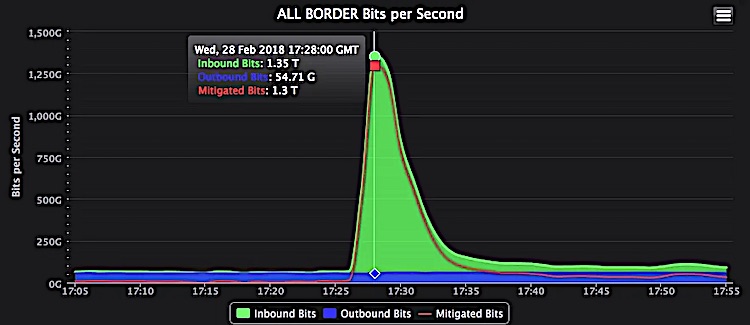 A 1.3Tbps DDoS attack shut down GitHub for 20 minutes in 2018
A malicious attempt to disrupt the host services
DDoS attacks aim to overwhelm websites and online services with traffic beyond what the server or network can handle. They are sometimes used to distract cybersecurity operations while other fraud activity, such as network infiltration or data theft, is underway.
These attacks are carried out using a bunch of internet-enabled devices infected with malware. Attackers remotely control these individual devices (also called bots).
A cluster of bots is known as a botnet, and once established, the attacker can use it to target a particular server or network. Each bot sends requests to certain IP addresses, rendering the website or service inoperable.
The first DDoS attack occurred in 1996, when one of the oldest ISPs, Panix, was brought down for several days via the SYN flood, a method that has become a classic Distributed Denial-of-Service attack. Over the next decade, these types of attacks became common.
An attack of 1 Gbps is enough to knock most organizations off the internet. According to Cisco, the total number of DDoS attacks reached 15 million by 2023, up from 7.9 million seen in 2018.
Example: In February 2020, Amazon Web Services was hit by an extreme DDoS attack, which targeted unknown customers via a method called Connectionless Lightweight Directory Access Protocol (CLDAP) Reflection. The attack peaked at 2.3 TBps and lasted for 3 days.
7. Brute-Force Attack
 Brute force attack on 5-bit key
Guessing password via trial and error method
A brute-force attack involves submitting credentials with the hope of eventually guessing right. Attackers try every possible password combination until the correct one is found.
This type of attack accounts for nearly 5% of all data breaches. Attackers don’t need to enter passwords manually. Instead, they create an algorithm or use readily available software to automatically test different combinations of usernames and passwords until the correct one is found.
Brute-force hacking tools are designed to generate thousands of passwords per second. Combined with powerful CPUs and GPUs, these automated tools could brute-force a strong encryption key in a matter of days.
Since longer passcodes can have more variables, they are exponentially more difficult to crack than shorter ones. Today, most symmetric algorithms use 128 or 256-bit keys, which can’t be cracked via brute force.
More specifically, the fastest supercomputer (with a speed of 100 petaFLOPS) would require 3.67×1055 years to exhaust the 256-bit AES key.
Example: In 2018, Firefox’s master password system could be easily bypassed via brute-force attacks. Passwords of millions of users were left vulnerable to malware and hackers. A year later, Firefox pushed out an update to fix this security glitch.
6. Ransomware
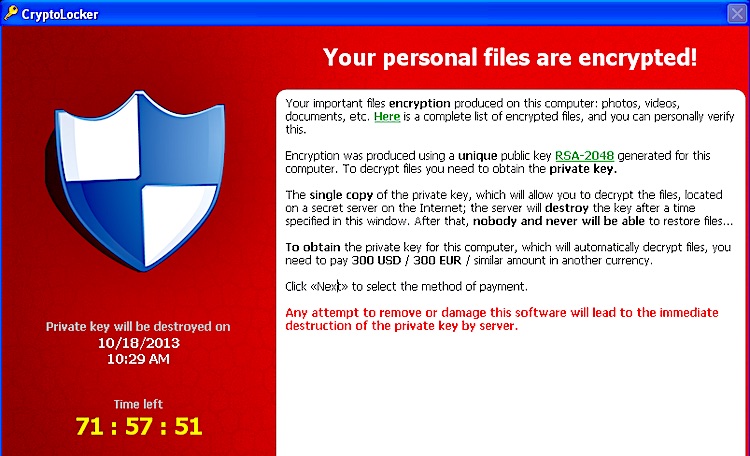 CryptLocker asking for a ransom
A malware that infects devices and threatens users with paying a ransom
Ransomware prevents users from accessing their personal files and demands a fee to regain access. It can infect your computer in several ways. The most common is malicious spam delivered via email that contains deceptive links or attachments.
Conventional ransomware locks the device in a way that is not tough for a skilled person to reverse. However, advanced malware encrypts the user’s files, making them unusable, and demands a fee to decrypt them. Attackers usually ask for ransoms in difficult-to-trace digital currencies like Bitcoin.
The first ransomware, named PC Cyborg, was created in 1989. It would encrypt all files in the C directory and then demand $189 from victims (by mail) to renew their license. Over the next decade, different variants of ransomware emerged.
However, advanced ransomware wouldn’t arrive until 2004, when GpCode encrypted personal data using weak RSA encryption. Since then, scams have spread worldwide, with new types still successfully targeting users.
In the first six months of 2018, there were more than 181 million ransomware attacks. In 2019, new ransomware variants increased by 46%, with 68,000 new ransomware Trojans detected on mobile devices.
Example: Perhaps the most popular example of ransomware is CryptoLocker, which occurred between September 2013 and May 2014. It was a Trojan horse that encrypted files on devices running Microsoft Windows. Its operators successfully extorted nearly $3 million.
5. Phishing

An unlawful attempt to obtain sensitive information
Phishing is a method used to steal personal information such as passwords and credit card details. Attackers use fake websites, emails, instant messages, or text messages while pretending to be a trusted source, tricking victims into sharing their information.
Phishing can also be used to deliver malware by encouraging users to click a link or download a document that secretly installs a malicious script on the device. On a larger scale, it is used to gain a foothold in private organizations or governmental networks.
For instance, in an advanced persistent threat, employees’ data is compromised to bypass security parameters, spread malicious programs inside a closed environment, or gain access to private data. This type of attack could remain undetected for an extended period.
According to Verizon’s 2019 data breach investigation report, 22% of breaches involved phishing. About 88% of organizations worldwide experienced spear-phishing attempts. 65% of US organizations experienced a successful phishing attack in 2019, nearly 10% higher than the global average.
Example: One of the most consequential phishing attacks occurred in 2016, when attackers compromised the Gmail account of Hillary Clinton campaign chairman John Podesta. Within hours of the US election results, Russian hackers sent phishing emails (from spoofed Harvard University email addresses) to publish fake news.
4. Worm
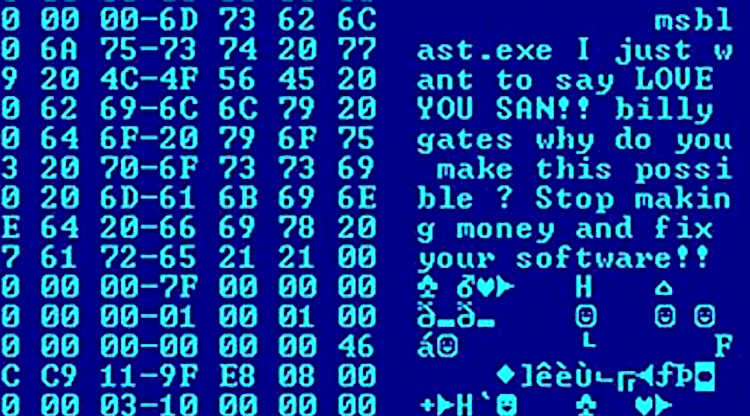 Blaster worm displaying a message
A standalone, self-replicating malware
A computer worm spreads copies of itself from device to device. It replicates itself without any user interaction and attaches itself to a software program to cause damage.
While most worms enter devices through attachments in spam emails or instant messages, they can also be transmitted through software vulnerabilities. Once these attachments are opened or installed, they work silently in the background, infecting system files.
Worms can inject malicious scripts and modify/delete existing files. Some worms are designed to exhaust system resources, such as memory space or bandwidth. They do so by making copies of themselves and overloading a shared network.
Worms can also exploit loopholes in the operating system, application security, or network configuration errors to copy themselves onto a fully accessible disk and spread those copies over public networks.
Example: The first computer worm with real-world impact was developed by Robert Morris in 1988. Named after its developers, Morris Worm caused denial of service for about 10% of the 60,000 machines connected to ARPANET. In 2003, another worm, Blaster, launched DDoS attacks against Microsoft’s servers, infecting as many as 2 billion devices.
3. Keylogger
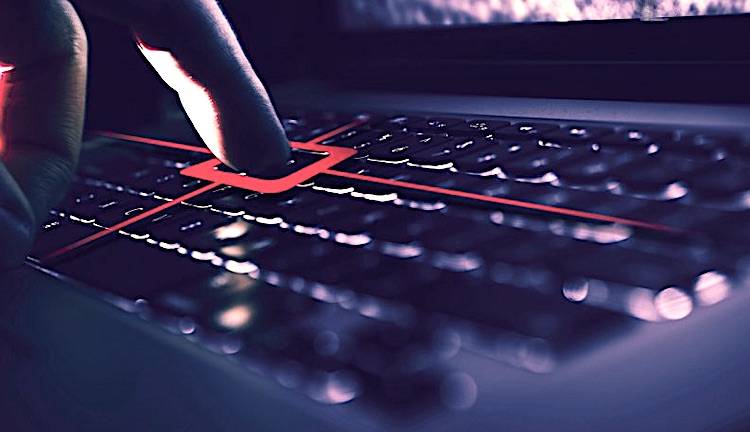
Records keys struck on a keyboard without users’ knowledge
Keystroke logging tools are one of the oldest forms of malware, dating back to typewriters. It is still used as part of larger cyber attacks. In simple terms, a keylogger records everything a user types on a computer.
Although it’s a simple software, attackers can use it as a potent tool to steal users’ data and sensitive information typed in through a keyboard. This gives attackers access to email IDs, passwords, account numbers, PIN codes, and other confidential information.
Hardware-based keyloggers can be plugged in-line between a keyboard and a computer, or installed via BIOS-level firmware. The software-based keylogger can be installed through webpage scripts or attachment files from a phishing email. It is installed automatically when a user visits a malicious site or opens a suspicious email attachment.
Example: In 2000, the FBI used a keylogger to catch two Russian cybercriminals. The keylogger was covertly installed on a machine, and the FBI used it to access suspects’ computers in Russia. The FBI obtained enough evidence to prosecute them. In 2018, Google removed 145 apps from the Play Store that contained keylogging malware.
2. Human Error
Employees occasionally make mistakes that lead to major data breaches
Humans are often the weakest link in data breach defenses. For instance, IT teams may accidentally expose customers’ personal information by misconfiguring servers, or employees may forward the company’s reports to outsiders via bulk email.

According to a study by the UK Information Commissioner’s Office (ICO), human error caused 90% of cyber data breaches in 2019.
CybSafe, a cloud-based cybersecurity awareness platform, reported that 9 out of 10 of the 2,376 breaches reported to the ICO in 2019 were caused by end-user errors. This is 61% and 87% up from the previous two years.
Example: In 2017, the SSL certificate used by LinkedIn for its country subdomains expired. While this event didn’t affect www.linkedin.com, it did invalidate us.linkedin.com along with a few other subdomains. As a result, millions of users couldn’t access LinkedIn for several hours.
1. Improper Disposal or Irresponsible Resale

Many organizations don’t destroy outdated hardware properly
Organizations, especially small ones, often do not prioritize data security when upgrading hardware and infrastructure. The end of the hardware lifecycle is a crucial aspect of responsible storage management.
Not all data breaches are caused by hacking. Some are results of improper disposal and irresponsible resale. To secure confidential data, companies must either decommission data or physically destroy hardware.
The National Institute of Standards and Technology has published guidelines for proper media sanitization and data disposition. They suggest that software-based methods, such as purge-level sanitization, can’t completely eliminate data from all storage regions on the media surface.
Example: In 2017, desktop computers from a government office in the City of Houston were sold at an online auction. After investigation, it was found that 23 of 38 computers had hard drives containing private information.
In the same year, ShopRite pharmacy in New Jersey discovered an electronic device that had been disposed of without first wiping its storage. It contained personal information of 10,000 patients, including their names, date of birth, signatures, phone numbers, and medical prescriptions.
Read More